Posts

29 July 15 (Launch Day)

We are go for launch! You can follow our progress to the launch site via spot (in our links page) once the balloon is launched you can follow it either via Spot or APRS. Wish us luck!

27 July 15

Image
We constructed the metal are which will extend out of the payload box and hold a picture of the Stem team so we can take a picture of it at 100,000 feet.  We also constructed the second level of the payload box.  We will put the APRS, both Spot gps devices, and the first GoPro Hero 3 camera on the first level.  The BeagleBone Black and the sensor board will go on the second level along with the second GoPro camera facing upward to take a picture of the balloon burst. We will rely on WiFi to turn the second camera on at 100,000 and start recording. We also constructed and sealed the regulator devic which will be used to inflate the balloon. To do: Make the wholes for the cameras in the styrofoam payload box. Finish writing the software to turn on the second GoPro and have it start recording. Test the pvc tube to be used to inflate the balloon.

20 July 15

Last week we began the shaping of the payload, we now have the shelf needed for the two levels we wanted to implement and we can fit all of our items into the payload box. We are also moving along smoothly now with our helium order, it was processed and the company has promised us immediate delivery so we may just be able to pull off the launch for our target date of the 29th! We are also now able to connect to the GoPro from the beagle via a WiFi adapter that Peter brought in and programmed and script for. We ordered and just received a new adapter for the team. Finally we ordered a separated charger that is capable of charging 2 GoPro batteries at once, is compatible with both wall outlets and car outlets, and comes with 2 spare batteries.

15 June 15

Installed WiFi adapter driver on BeagleBone Black set for launch. Installed goprohero Python library. Tested commands. To connect to GoPro camera, make sure adapter is plugged into BBB USB port and GoPro wifi is on before powering up.  (BBB must be powered by an external 5V power source). After boot up, ssh into beaglebone as root. Type 'wicd-curses', scroll down to StemGoPro. Type capital 'C'. After 10 to 20 seconds you should see a message that it connected.

14 June 15

Image
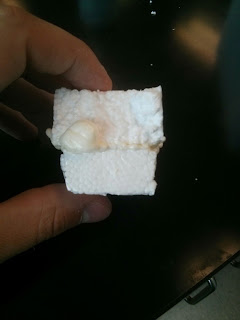
Today we cut out two pieces of Styrofoam from our test/scrap box to see how well the polyurethane sealant we have will bond to the polystyrene Styrofoam. Results were favorable as shown below: The polyurethane foam sealant we are using is Handi Foam 40 Series and is actually stronger than the Styrofoam that it bonded too, so we will most likely be using a combination of it and another type of adhesive we have ordered from 3M which is their spray adhesive specifically branded for use with Styrofoam. This will be arriving on Thursday so we will begin testing it then. We are also working on the layout of instruments and items within the balloon. After the first attempt it was immediately obvious how tight we are going to be on space. We are actually thinking of building 2 levels into the box whereby we will have several components in the bottom with a shelf of Styrofoam on top of them resting on 2 tabs secured onto the side walls with the rest of the payload on top. This is what...

13 June 15

I configured a Beaglebone Black to recognize the compact wifi adapter.  It recognized the wifi in room S-315 "Bergen-Wifi," however I can't log on with my Bergen username and password.  I followed instructons to set up the wifi dongle and get it working on the BBB at:  http://inspire.logicsupply.com/2014/07/beaglebone-wifi-installation.html#comment-form_5208021017570179065 . Attach ethernet cable to BBB.  WiFi dongle should not be attached. Also BBB must be plugged into an external 5V power supply. You should have at least Debian 3.8.13 BONE70 From R C Nelson. # uname -a (to check for Debian version) Then run the following commands: mkdir -p /etc/Wireless/RT2870STA/ cd /etc/Wireless/RT2870STA/ wget https://raw.githubusercontent.com/rcn-ee/mt7601u/master/src/RT2870STA.dat echo "mt7601Usta" > /etc/modules-load.d/mt7601.conf Remove ethernet cable and attach WiFi dongle and reboot. After reboot run the following command in BBB terminal # wicd-...

9 July 2015

Yesterday we verified the thermistor readings using Professor Griffo's calibrated thermocouple which was certified accurate to within 3/4 of a degree Fahrenheit. All thermistors at both room temperature and submerged within a cup of ice read within the +/- error of the thermocouple verifying that we are reading accurate temperatures with our sensors over a range of environments. Today we will begin construction of the box, we have a scrap Styrofoam box to experiment with to see what the best (read strongest and lightest for our purposes) way of joining the foam to itself and our components. Then we will construct standoffs for the protoboard as well and attach the beagle via standoffs to the protoboard and secure the whole assembly to the Styrofoam. We will also need to construct a camera mount within the box which we will do with the foam, and find a way to mount the picture onto an arm and secure it to the box. Go Pro Update: Installed and tested the goprohero  Python module...